 Mathieu Benoit
4028421cb8
Mathieu Benoit
4028421cb8
A migration leaves one database per step and they all still exist, so the tool compares them side by side rather than replaying anything. Six Odoo starts would cost an hour, write to the databases and need the checkout switched at each step; the same inspection in SQL takes under half a second per database and touches nothing. Measured on a real migration: seven databases surveyed in 3.8 seconds. It reports what each step gained and lost — modules, models, views, menus, attachments — and ends on the comparison of the ENDS, which is not the sum of the steps: a module dropped at 15 and put back at 17 lost nothing, and adding the steps would count it twice. The signal that matters is rows. A module removed is visible; a table going from four thousand rows to zero is visible nowhere. Two rename heuristics were tried and rejected on real data before the one that holds. Row count alone paired an account tag table with dms_directory — both had seven rows. A shared five-letter word paired two cleanup tables. Overall name similarity separates them. And a renamed table stays in the loss list, annotated: removing it was the real danger, since a wrong pairing would have hidden a genuine loss. --- FR --- [ADD] analyse : ce qu'une migration a gagné et perdu, palier par palier Une migration laisse une base par palier et elles existent toutes encore : l'outil les compare côte à côte plutôt que de rejouer quoi que ce soit. Six démarrages d'Odoo coûteraient une heure et écriraient dans les bases ; la même inspection en SQL prend moins d'une demi-seconde par base. Mesuré sur une vraie migration : sept bases inspectées en 3,8 secondes. Le bilan final compare les EXTRÉMITÉS, ce qui n'est pas la somme des paliers : un module retiré en 15 puis remis en 17 n'a rien perdu. Le signal qui compte, ce sont les lignes. Un module en moins se voit ; une table qui passe de quatre mille lignes à zéro ne se voit nulle part. Deux rapprochements de renommage ont été essayés et rejetés sur des données réelles. Et une table renommée reste dans la liste des pertes, annotée : l'en retirer était le vrai danger. Assisted-by: Claude Opus 5 |
||
|---|---|---|
| .claude | ||
| .github | ||
| conf | ||
| contracts | ||
| doc | ||
| docker | ||
| manifest | ||
| mobile | ||
| private | ||
| requirement | ||
| script | ||
| test | ||
| .editorconfig | ||
| .erplibre-semver-version | ||
| .flake8 | ||
| .gitignore | ||
| .prettierignore | ||
| AI_POLICY.base.md | ||
| AI_POLICY.fr.md | ||
| AI_POLICY.md | ||
| CHANGELOG.base.md | ||
| CHANGELOG.fr.md | ||
| CHANGELOG.md | ||
| CLAUDE.md | ||
| coverage_run.sh | ||
| docker-compose-dev.yml | ||
| docker-compose.yml | ||
| env_var.sh | ||
| install.sh | ||
| LICENSE | ||
| Makefile | ||
| odoo_bin.sh | ||
| package-lock.json | ||
| package.json | ||
| poetry.toml | ||
| README.base.md | ||
| README.fr.md | ||
| README.md | ||
| run.sh | ||
| source_repo_addons.csv | ||
| test.sh | ||
| TODO.base.md | ||
| TODO.fr.md | ||
| TODO.md | ||
ERPLibre
ERPLibre is a CRM/ERP platform including automated installation, maintenance, and development of open source modules of the Odoo community version. It is a "soft-fork" of the Odoo Community Edition (OCE), meaning it aims at contributing back upstream. It is based on a set of production-ready modules, supported by the Odoo Community Association (OCA) and an ecosystem of specialized companies. This solution ensures digital sovereignty in a local environment while integrating pre-trained Generative Transformers (GPT), bringing an additional dimension to data management and automation.
Follow us on Mastodon : https://fosstodon.org/@erplibre
Features
- Multi-version Odoo support : run Odoo 12.0, 13.0, 14.0, 15.0, 16.0, 17.0 and 18.0 in the same workspace, with independent Python virtual environments (
.venv.erplibreand.venv.odooXX) - Interactive CLI (TODO.py) : guided interactive tool for installation, execution, database management, code formatting, mobile compilation, and more. Launch it with
make - Code generator : generate Odoo modules automatically with support for views, portal, snippets, inheritance, i18n, and JavaScript
- Selenium automation : web testing and automation with Selenium Grid, video recording, and login automation
- Mobile application : ERPLibre Home Mobile (Owl + Capacitor), compiled and deployed via TODO.py
- Docker deployment : production-ready Docker images with PostgreSQL 18 and PostGIS
- Deployment tools : Nginx, Apache, Cloudflare DDNS, Certbot SSL, systemd services
- Database tools : backup, restore, clone, migration between versions, production-to-dev migration
- Performance tools : request-per-second measurement, parallel test execution, coverage analysis
Supported Odoo versions
| Odoo version | Python | Status |
|---|---|---|
| 18.0 | 3.12.10 | Active |
| 17.0 | 3.10.18 | Inactive |
| 16.0 | 3.10.18 | Inactive |
| 15.0 | 3.8.20 | Deprecated |
| 14.0 | 3.8.20 | Deprecated |
| 13.0 | 3.7.17 | Deprecated |
| 12.0 | 3.7.17 | Deprecated |
Switch between versions with make switch_odoo_18, make switch_odoo_16, etc.
Supported platforms
- Ubuntu : 24.04, 25.10, 26.04 — 20.04 and 22.04 are dropped, pikepdf requiring a qpdf 12.2 built in C++20
- Linux Mint : 22.3
- Debian : 12 (bookworm) and 13 (trixie)
- Fedora : 41 and later
- AlmaLinux, Rocky Linux : 9 and 10 — RHEL and CentOS Stream take the same path
- openSUSE : Leap 16.0 and Tumbleweed
- Arch Linux : rolling release
- macOS : through mise or pyenv
- Windows : through WSL or Docker
- Architectures : amd64, arm64 and s390x (IBM Z mainframe)
Installation in production
Easy installation on Ubuntu or Debian using Docker
This has been tested in Debian 12 and Ubuntu 24.04 LTS.
Note : This is meant for a test environment, on a local network or similar environment not directly exposed to the Internet.
-
Make sure Docker and nginx web server are installed:
sudo apt install docker.io docker-compose-v2 nginx -
Get the latest ERPLibre Docker compose file:
wget https://raw.githubusercontent.com/ERPLibre/ERPLibre/master/docker-compose.yml -
Install and run ERPLibre with Docker running as a daemon (web server):
sudo docker compose up -d -
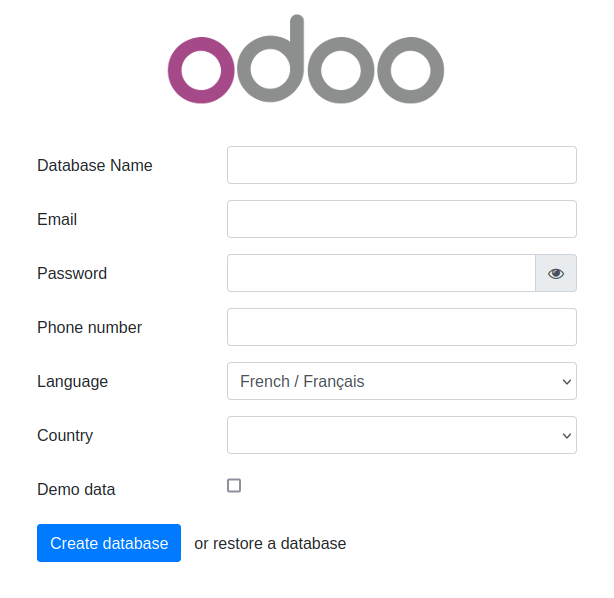
Open the final installation step at this web page :
http://[server IP]:8069/web/database/manager
-
Finish the installation by providing a database name, email and password. then click on Create Database. Depending on your system resources this may take more than 2 minutes without feedback ! Check your browser loading indicator.
-
Next, the web page will reload itself, and you should see the Applications list in ERPLibre:
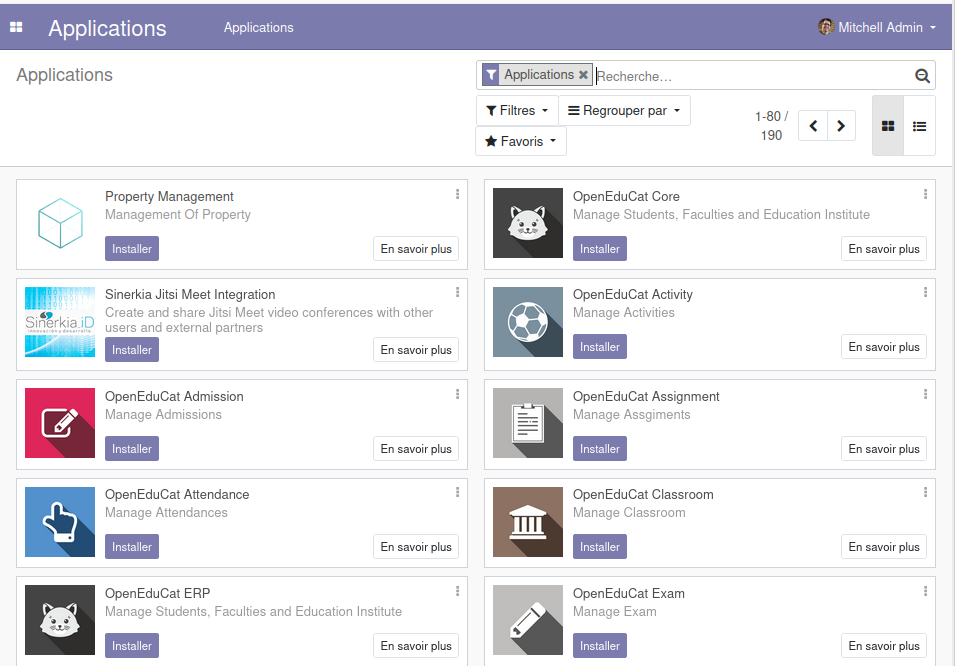
You can now personalize your ERPLibre installation.
For more information, read Docker guide.
Install from source code
Automated installation
For Debian/Ubuntu
sudo apt install make python3
Clone the project:
git clone https://github.com/ERPLibre/ERPLibre.git
cd ERPLibre
Follow the instruction on the following script, it will try to detect your environment.
make
Manually
Into Ubuntu, minimal dependency:
sudo apt install make git curl
Into Ubuntu, developer dependency:
sudo apt install make build-essential libssl-dev zlib1g-dev libreadline-dev libsqlite3-dev curl llvm libncurses5-dev libncursesw5-dev xz-utils tk-dev liblzma-dev libbz2-dev libldap2-dev libsasl2-dev
Clone the project:
git clone https://github.com/ERPLibre/ERPLibre.git
cd ERPLibre
make install_os detects the distribution and picks the right dependency script: apt for Ubuntu, Linux Mint and Debian, dnf for Fedora and the RHEL family, zypper for openSUSE, pacman for Arch. See the supported platforms above.
make install_os
make install_odoo_18
Install a specific Odoo version:
make install_odoo_16
make install_odoo_17
make install_odoo_18
Update your configuration if you need to run from another interface than 127.0.0.1, file config.conf
xmlrpc_interface = 0.0.0.0
Show version :
make version
Ready to execute:
make run
Test
Execute ERPLibre test with his code generator.
time make test_full_fast
Documentation
| Guide | Description |
|---|---|
| DISCOVER | Learn and explore ERPLibre |
| DEVELOPMENT | Development environment setup |
| PRODUCTION | Production server deployment |
| RUN | Execution modes and use cases |
| CODE_GENERATOR | Odoo module code generation |
| MIGRATION | Database migration between versions |
| GIT_REPO | Git repository management |
| POETRY | Python dependency management |
| FAQ | Frequently asked questions |
| HOWTO | How-to guides |
| WINDOWS_INSTALLATION | Windows installation |
Contributing
See CONTRIBUTION.md for guidelines.
License
This project is licensed under the GNU Affero General Public License v3.0.