 Mathieu Benoit
e20d8d9baa
Mathieu Benoit
e20d8d9baa
uv replaces pip where it can: the tools venv and the Poetry bootstrap. The choice lives in EL_PIP_PROVIDER -- auto, uv or pip -- and in a single file, lib_pip_provider.sh, on the exact model of the mise/pyenv switch. A uv failure falls back to pip: it is stricter on metadata and rejects packages pip accepts. Three guards. The target always goes through "--python" rather than being inferred from the active venv: poetry.toml declares a "./.venv" uv would also look for. Python 3.7, still used by Odoo 12 and 13, stays on pip. And "uv pip sync" is never used: it would delete pip itself and everything Poetry laid down. One bug falls along the way: the idempotence guard aimed at .venv.erplibre/bin/poetry while Poetry installs into the Odoo venv, so a successful replay reported failure all the same. --- FR --- uv remplace pip là où il le peut : le venv d'outils et l'amorçage de Poetry. Le choix vit dans EL_PIP_PROVIDER — auto, uv ou pip — et dans un seul fichier, lib_pip_provider.sh, sur le modèle exact de l'aiguillage mise/pyenv. Un échec d'uv retombe sur pip : il est plus strict sur les métadonnées et refuse des paquets que pip accepte. Trois gardes. La cible passe toujours par « --python » plutôt que d'être déduite du venv actif : poetry.toml déclare un « ./.venv » qu'uv chercherait aussi. Python 3.7, encore utilisé par Odoo 12 et 13, reste sur pip. Et « uv pip sync » n'est jamais employé : il supprimerait pip lui-même et tout ce que Poetry a posé. Un défaut tombe au passage : le garde d'idempotence visait .venv.erplibre/bin/poetry alors que Poetry s'installe dans le venv Odoo, si bien qu'un rejeu réussi rapportait quand même un échec. Assisted-by: Claude Opus 5 |
||
|---|---|---|
| .claude | ||
| .github | ||
| conf | ||
| contracts | ||
| doc | ||
| docker | ||
| manifest | ||
| mobile | ||
| private | ||
| requirement | ||
| script | ||
| test | ||
| .editorconfig | ||
| .erplibre-semver-version | ||
| .flake8 | ||
| .gitignore | ||
| .prettierignore | ||
| AI_POLICY.base.md | ||
| AI_POLICY.fr.md | ||
| AI_POLICY.md | ||
| CHANGELOG.base.md | ||
| CHANGELOG.fr.md | ||
| CHANGELOG.md | ||
| CLAUDE.md | ||
| coverage_run.sh | ||
| docker-compose-dev.yml | ||
| docker-compose.yml | ||
| env_var.sh | ||
| install.sh | ||
| LICENSE | ||
| Makefile | ||
| odoo_bin.sh | ||
| package-lock.json | ||
| package.json | ||
| poetry.toml | ||
| README.base.md | ||
| README.fr.md | ||
| README.md | ||
| run.sh | ||
| source_repo_addons.csv | ||
| test.sh | ||
| TODO.base.md | ||
| TODO.fr.md | ||
| TODO.md | ||
ERPLibre
ERPLibre is a CRM/ERP platform including automated installation, maintenance, and development of open source modules of the Odoo community version. It is a "soft-fork" of the Odoo Community Edition (OCE), meaning it aims at contributing back upstream. It is based on a set of production-ready modules, supported by the Odoo Community Association (OCA) and an ecosystem of specialized companies. This solution ensures digital sovereignty in a local environment while integrating pre-trained Generative Transformers (GPT), bringing an additional dimension to data management and automation.
Follow us on Mastodon : https://fosstodon.org/@erplibre
Features
- Multi-version Odoo support : run Odoo 12.0, 13.0, 14.0, 15.0, 16.0, 17.0 and 18.0 in the same workspace, with independent Python virtual environments (
.venv.erplibreand.venv.odooXX) - Interactive CLI (TODO.py) : guided interactive tool for installation, execution, database management, code formatting, mobile compilation, and more. Launch it with
make - Code generator : generate Odoo modules automatically with support for views, portal, snippets, inheritance, i18n, and JavaScript
- Selenium automation : web testing and automation with Selenium Grid, video recording, and login automation
- Mobile application : ERPLibre Home Mobile (Owl + Capacitor), compiled and deployed via TODO.py
- Docker deployment : production-ready Docker images with PostgreSQL 18 and PostGIS
- Deployment tools : Nginx, Apache, Cloudflare DDNS, Certbot SSL, systemd services
- Database tools : backup, restore, clone, migration between versions, production-to-dev migration
- Performance tools : request-per-second measurement, parallel test execution, coverage analysis
Supported Odoo versions
| Odoo version | Python | Status |
|---|---|---|
| 18.0 | 3.12.10 | Active |
| 17.0 | 3.10.18 | Inactive |
| 16.0 | 3.10.18 | Inactive |
| 15.0 | 3.8.20 | Deprecated |
| 14.0 | 3.8.20 | Deprecated |
| 13.0 | 3.7.17 | Deprecated |
| 12.0 | 3.7.17 | Deprecated |
Switch between versions with make switch_odoo_18, make switch_odoo_16, etc.
Supported platforms
- Linux : Ubuntu 24.04, 25.10, 26.04; Debian 12; AlmaLinux 9+; Rocky Linux 9+; Arch Linux
- macOS : via mise ou pyenv
- Windows : via WSL or Docker
- Mainframe : 390x architecture
Installation in production
Easy installation on Ubuntu or Debian using Docker
This has been tested in Debian 12 and Ubuntu 24.04 LTS.
Note : This is meant for a test environment, on a local network or similar environment not directly exposed to the Internet.
-
Make sure Docker and nginx web server are installed:
sudo apt install docker.io docker-compose-v2 nginx -
Get the latest ERPLibre Docker compose file:
wget https://raw.githubusercontent.com/ERPLibre/ERPLibre/master/docker-compose.yml -
Install and run ERPLibre with Docker running as a daemon (web server):
sudo docker compose up -d -
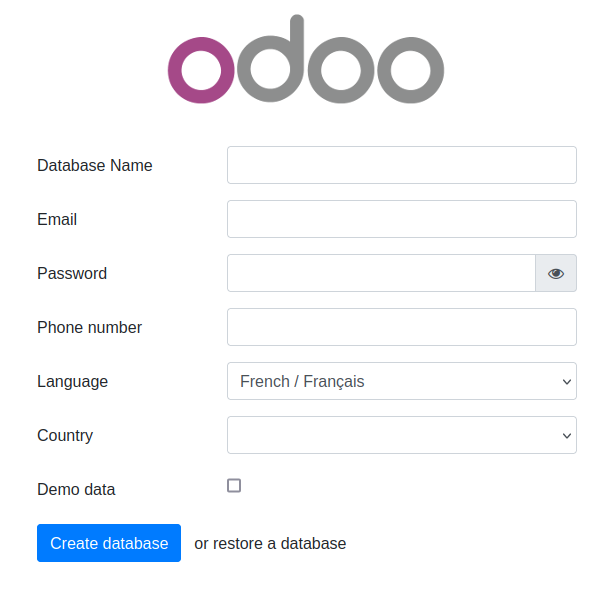
Open the final installation step at this web page :
http://[server IP]:8069/web/database/manager
-
Finish the installation by providing a database name, email and password. then click on Create Database. Depending on your system resources this may take more than 2 minutes without feedback ! Check your browser loading indicator.
-
Next, the web page will reload itself, and you should see the Applications list in ERPLibre:
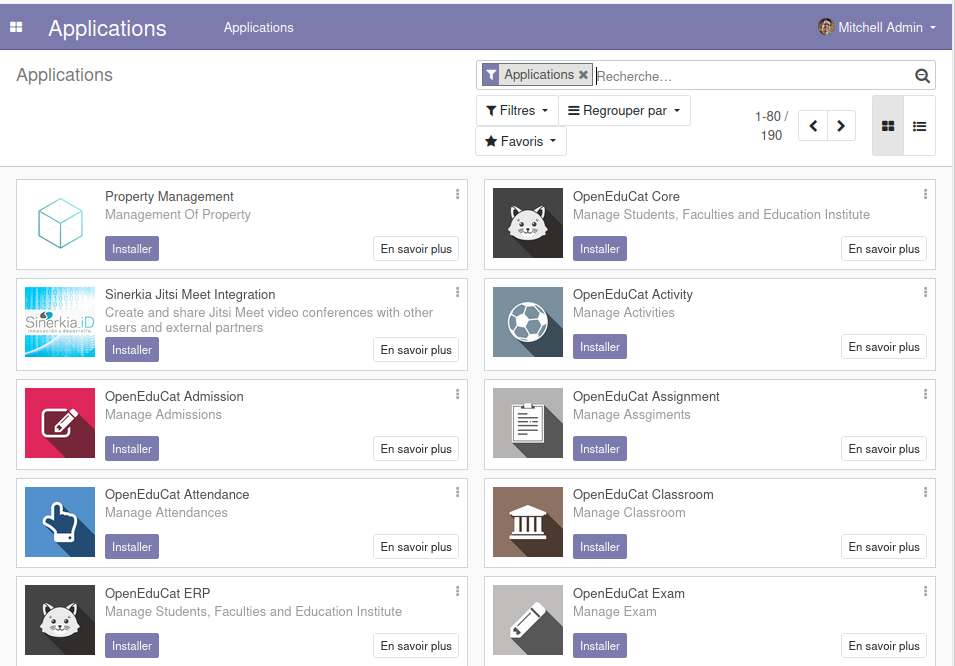
You can now personalize your ERPLibre installation.
For more information, read Docker guide.
Install from source code
Automated installation
For Debian/Ubuntu
sudo apt install make python3
Clone the project:
git clone https://github.com/ERPLibre/ERPLibre.git
cd ERPLibre
Follow the instruction on the following script, it will try to detect your environment.
make
Manually
Into Ubuntu, minimal dependency:
sudo apt install make git curl
Into Ubuntu, developer dependency:
sudo apt install make build-essential libssl-dev zlib1g-dev libreadline-dev libsqlite3-dev curl llvm libncurses5-dev libncursesw5-dev xz-utils tk-dev liblzma-dev libbz2-dev libldap2-dev libsasl2-dev
Clone the project:
git clone https://github.com/ERPLibre/ERPLibre.git
cd ERPLibre
Support Ubuntu 24.04, 25.10, 26.04, AlmaLinux 9+, Rocky Linux 9+ and OSX.
make install_os
make install_odoo_18
Install a specific Odoo version:
make install_odoo_16
make install_odoo_17
make install_odoo_18
Update your configuration if you need to run from another interface than 127.0.0.1, file config.conf
xmlrpc_interface = 0.0.0.0
Show version :
make version
Ready to execute:
make run
Test
Execute ERPLibre test with his code generator.
time make test_full_fast
Documentation
| Guide | Description |
|---|---|
| DISCOVER | Learn and explore ERPLibre |
| DEVELOPMENT | Development environment setup |
| PRODUCTION | Production server deployment |
| RUN | Execution modes and use cases |
| CODE_GENERATOR | Odoo module code generation |
| MIGRATION | Database migration between versions |
| GIT_REPO | Git repository management |
| POETRY | Python dependency management |
| FAQ | Frequently asked questions |
| HOWTO | How-to guides |
| WINDOWS_INSTALLATION | Windows installation |
Contributing
See CONTRIBUTION.md for guidelines.
License
This project is licensed under the GNU Affero General Public License v3.0.