 Mathieu Benoit
b63e99ad6c
Mathieu Benoit
b63e99ad6c
**Ubuntu 20.04 et 22.04 ne sont plus supportées**, sur toutes les architectures. ``` [UPD] release: deploy and run a fleet of VMs The QEMU deployment form stops treating the fleet as one machine: vCPU, RAM, disk, type, ERPLibre branch, Odoo version and timezone are set per VM, a lock shields one from the global profile, an entry can be renamed or duplicated. The install dashboard follows through -- update by parts, restart Odoo or delete a machine without leaving it. A graphical VM picks its desktop and its application store, and the SSH command to reach it is composed from ~/.ssh/config. Installation reaches four new grounds. openSUSE Leap and Tumbleweed, AlmaLinux, Rocky and Fedora 43 join the catalogue, and the s390x build chain works end to end on all of them: no wheel is published for that architecture, so everything compiles against distribution headers. mise lays down a precompiled CPython where pyenv built one, uv places the Python packages, and both fall back to the old path on failure. Ubuntu 20.04 and 22.04 are dropped -- pikepdf needs qpdf 12.2, built in C++20, while focal ships GCC 9. That is the only breaking change here. --- FR --- Le formulaire de déploiement QEMU cesse de traiter le parc comme une seule machine : vCPU, RAM, disque, type, branche ERPLibre, version d'Odoo et fuseau horaire se règlent par VM, un verrou en soustrait une au profil global, une entrée se renomme ou se duplique. Le tableau de bord suit — mettre à jour par parties, redémarrer Odoo ou supprimer une machine sans le quitter. Une VM graphique choisit son bureau et son magasin d'applications, et la commande SSH pour la joindre est composée depuis ~/.ssh/config. L'installation gagne quatre terrains. openSUSE Leap et Tumbleweed, AlmaLinux, Rocky et Fedora 43 rejoignent le catalogue, et la chaîne de compilation s390x y fonctionne de bout en bout : aucune roue n'est publiée pour cette architecture, donc tout se compile contre les en-têtes de la distribution. mise pose un CPython précompilé là où pyenv en compilait un, uv pose les paquets Python, et les deux retombent sur l'ancien chemin en cas d'échec. Ubuntu 20.04 et 22.04 partent — pikepdf exige qpdf 12.2, bâti en C++20, quand focal livre GCC 9. C'est le seul changement cassant du lot. Assisted-by: Claude Opus 5 ``` **Per-VM deployment.** vCPU, RAM, disk, VM type, ERPLibre branch, Odoo version and timezone are each set on the VM, all the way down to the remote command built per machine. A lock shields a VM from the global x1..x4 profile and shows on the whole row; an entry can be renamed or deployed in several copies. Presets are finer where development VMs actually live: every gigabyte and every vCPU up to 16. **Graphical VMs.** A server / desktop choice offering GNOME or Cinnamon, the application store picked per VM (.deb only, Flatpak tooling, or snap), and a composed SSH command to reach the remote desktop — read from `~/.ssh/config` so a nested VM is reachable through its ProxyJump, with the hypervisor console as a third route. **Install dashboard.** Acts on a VM without leaving it: update by parts — system packages, then git repositories, then Python dependencies, never chained so one failure cannot take the rest down — restart Odoo, or delete after a confirmation naming the disk. Architecture column, both-way scrolling and resizable columns. **Platforms.** openSUSE Leap 16.0 and Tumbleweed, AlmaLinux, Rocky, Fedora 43 and the CentOS-family fixes. The s390x build chain works end to end on Debian, EL9, EL10, Fedora and openSUSE. Ubuntu 20.04 and 22.04 are removed. **Toolchain.** `EL_PYTHON_PROVIDER` chooses mise or pyenv, `EL_PIP_PROVIDER` chooses uv or pip; each lives in a single library file, and each falls back on failure. Neither tool is ever installed on its own — `make install_mise` and `make install_uv` carry that decision. A Poetry dependency can be declined per architecture. **Déploiement par VM.** vCPU, RAM, disque, type de VM, branche ERPLibre, version d'Odoo et fuseau horaire se règlent chacun sur la VM, jusqu'à la commande distante bâtie par machine. Un verrou soustrait une VM au profil global x1..x4 et se voit à la ligne entière ; une entrée se renomme ou se déploie en plusieurs exemplaires. Les préréglages sont plus fins là où vivent les VM de développement : chaque gigaoctet et chaque vCPU jusqu'à 16. **VM graphiques.** Un choix serveur / bureau proposant GNOME ou Cinnamon, le magasin d'applications retenu par VM (.deb seul, outillage Flatpak, ou snap), et une commande SSH composée pour joindre le bureau distant — lue depuis `~/.ssh/config`, si bien qu'une VM imbriquée est atteignable par son ProxyJump, avec la console de l'hyperviseur comme troisième voie. **Tableau de bord d'installation.** Agit sur une VM sans la quitter : mise à jour par parties — paquets système, puis dépôts git, puis dépendances Python, jamais enchaînées pour qu'un échec n'emporte pas le reste — redémarrage d'Odoo, ou suppression après une confirmation nommant le disque. Colonne d'architecture, défilement dans les deux sens et colonnes ajustables. **Plateformes.** openSUSE Leap 16.0 et Tumbleweed, AlmaLinux, Rocky, Fedora 43 et les correctifs de la famille CentOS. La chaîne de compilation s390x fonctionne de bout en bout sur Debian, EL9, EL10, Fedora et openSUSE. Ubuntu 20.04 et 22.04 sont retirées. **Outillage.** `EL_PYTHON_PROVIDER` choisit mise ou pyenv, `EL_PIP_PROVIDER` choisit uv ou pip ; chacun vit dans un seul fichier de bibliothèque, et chacun retombe sur l'autre en cas d'échec. Aucun des deux n'est jamais installé de lui-même — `make install_mise` et `make install_uv` portent cette décision. Une dépendance Poetry peut être déclinée par architecture. |
||
|---|---|---|
| .claude | ||
| .github | ||
| conf | ||
| contracts | ||
| doc | ||
| docker | ||
| manifest | ||
| mobile | ||
| private | ||
| requirement | ||
| script | ||
| test | ||
| .editorconfig | ||
| .erplibre-semver-version | ||
| .flake8 | ||
| .gitignore | ||
| .prettierignore | ||
| AI_POLICY.base.md | ||
| AI_POLICY.fr.md | ||
| AI_POLICY.md | ||
| CHANGELOG.base.md | ||
| CHANGELOG.fr.md | ||
| CHANGELOG.md | ||
| CLAUDE.md | ||
| coverage_run.sh | ||
| docker-compose-dev.yml | ||
| docker-compose.yml | ||
| env_var.sh | ||
| install.sh | ||
| LICENSE | ||
| Makefile | ||
| odoo_bin.sh | ||
| package-lock.json | ||
| package.json | ||
| poetry.toml | ||
| README.base.md | ||
| README.fr.md | ||
| README.md | ||
| run.sh | ||
| source_repo_addons.csv | ||
| test.sh | ||
| TODO.base.md | ||
| TODO.fr.md | ||
| TODO.md | ||
ERPLibre
ERPLibre is a CRM/ERP platform including automated installation, maintenance, and development of open source modules of the Odoo community version. It is a "soft-fork" of the Odoo Community Edition (OCE), meaning it aims at contributing back upstream. It is based on a set of production-ready modules, supported by the Odoo Community Association (OCA) and an ecosystem of specialized companies. This solution ensures digital sovereignty in a local environment while integrating pre-trained Generative Transformers (GPT), bringing an additional dimension to data management and automation.
Follow us on Mastodon : https://fosstodon.org/@erplibre
Features
- Multi-version Odoo support : run Odoo 12.0, 13.0, 14.0, 15.0, 16.0, 17.0 and 18.0 in the same workspace, with independent Python virtual environments (
.venv.erplibreand.venv.odooXX) - Interactive CLI (TODO.py) : guided interactive tool for installation, execution, database management, code formatting, mobile compilation, and more. Launch it with
make - Code generator : generate Odoo modules automatically with support for views, portal, snippets, inheritance, i18n, and JavaScript
- Selenium automation : web testing and automation with Selenium Grid, video recording, and login automation
- Mobile application : ERPLibre Home Mobile (Owl + Capacitor), compiled and deployed via TODO.py
- Docker deployment : production-ready Docker images with PostgreSQL 18 and PostGIS
- Deployment tools : Nginx, Apache, Cloudflare DDNS, Certbot SSL, systemd services
- Database tools : backup, restore, clone, migration between versions, production-to-dev migration
- Performance tools : request-per-second measurement, parallel test execution, coverage analysis
Supported Odoo versions
| Odoo version | Python | Status |
|---|---|---|
| 18.0 | 3.12.10 | Active |
| 17.0 | 3.10.18 | Inactive |
| 16.0 | 3.10.18 | Inactive |
| 15.0 | 3.8.20 | Deprecated |
| 14.0 | 3.8.20 | Deprecated |
| 13.0 | 3.7.17 | Deprecated |
| 12.0 | 3.7.17 | Deprecated |
Switch between versions with make switch_odoo_18, make switch_odoo_16, etc.
Supported platforms
- Ubuntu : 24.04, 25.10, 26.04 — 20.04 and 22.04 are dropped, pikepdf requiring a qpdf 12.2 built in C++20
- Linux Mint : 22.3
- Debian : 12 (bookworm) and 13 (trixie)
- Fedora : 41 and later
- AlmaLinux, Rocky Linux : 9 and 10 — RHEL and CentOS Stream take the same path
- openSUSE : Leap 16.0 and Tumbleweed
- Arch Linux : rolling release
- macOS : through mise or pyenv
- Windows : through WSL or Docker
- Architectures : amd64, arm64 and s390x (IBM Z mainframe)
Installation in production
Easy installation on Ubuntu or Debian using Docker
This has been tested in Debian 12 and Ubuntu 24.04 LTS.
Note : This is meant for a test environment, on a local network or similar environment not directly exposed to the Internet.
-
Make sure Docker and nginx web server are installed:
sudo apt install docker.io docker-compose-v2 nginx -
Get the latest ERPLibre Docker compose file:
wget https://raw.githubusercontent.com/ERPLibre/ERPLibre/master/docker-compose.yml -
Install and run ERPLibre with Docker running as a daemon (web server):
sudo docker compose up -d -
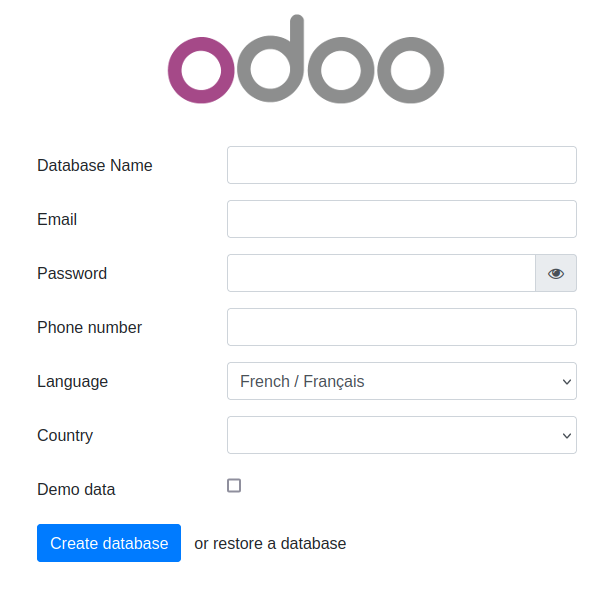
Open the final installation step at this web page :
http://[server IP]:8069/web/database/manager
-
Finish the installation by providing a database name, email and password. then click on Create Database. Depending on your system resources this may take more than 2 minutes without feedback ! Check your browser loading indicator.
-
Next, the web page will reload itself, and you should see the Applications list in ERPLibre:
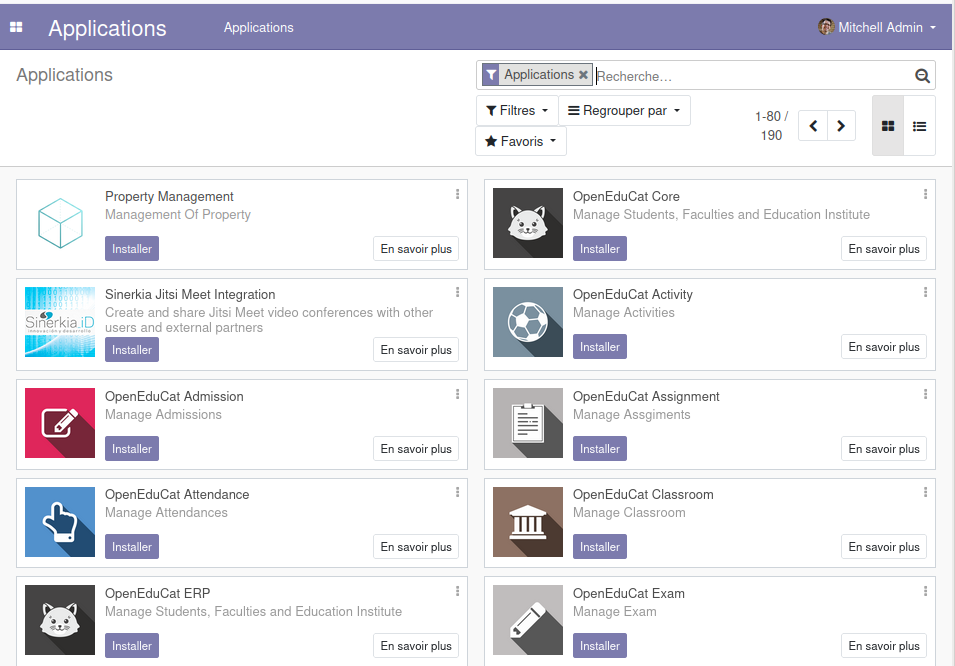
You can now personalize your ERPLibre installation.
For more information, read Docker guide.
Install from source code
Automated installation
For Debian/Ubuntu
sudo apt install make python3
Clone the project:
git clone https://github.com/ERPLibre/ERPLibre.git
cd ERPLibre
Follow the instruction on the following script, it will try to detect your environment.
make
Manually
Into Ubuntu, minimal dependency:
sudo apt install make git curl
Into Ubuntu, developer dependency:
sudo apt install make build-essential libssl-dev zlib1g-dev libreadline-dev libsqlite3-dev curl llvm libncurses5-dev libncursesw5-dev xz-utils tk-dev liblzma-dev libbz2-dev libldap2-dev libsasl2-dev
Clone the project:
git clone https://github.com/ERPLibre/ERPLibre.git
cd ERPLibre
make install_os detects the distribution and picks the right dependency script: apt for Ubuntu, Linux Mint and Debian, dnf for Fedora and the RHEL family, zypper for openSUSE, pacman for Arch. See the supported platforms above.
make install_os
make install_odoo_18
Install a specific Odoo version:
make install_odoo_16
make install_odoo_17
make install_odoo_18
Update your configuration if you need to run from another interface than 127.0.0.1, file config.conf
xmlrpc_interface = 0.0.0.0
Show version :
make version
Ready to execute:
make run
Test
Execute ERPLibre test with his code generator.
time make test_full_fast
Documentation
| Guide | Description |
|---|---|
| DISCOVER | Learn and explore ERPLibre |
| DEVELOPMENT | Development environment setup |
| PRODUCTION | Production server deployment |
| RUN | Execution modes and use cases |
| CODE_GENERATOR | Odoo module code generation |
| MIGRATION | Database migration between versions |
| GIT_REPO | Git repository management |
| POETRY | Python dependency management |
| FAQ | Frequently asked questions |
| HOWTO | How-to guides |
| WINDOWS_INSTALLATION | Windows installation |
Contributing
See CONTRIBUTION.md for guidelines.
License
This project is licensed under the GNU Affero General Public License v3.0.