 Mathieu Benoit
ad63236375
Mathieu Benoit
ad63236375
Premier fichier de script/analyse/, le paquet d'outils qui répondent à « qu'y a-t-il dans cette base, et qu'est-ce qui cassera à la montée de version ». Ce commit ne livre que ce que le premier outil consommera, pas une bibliothèque spéculative. psql en sous-processus, pas psycopg2. La raison est déjà écrite dans reset_stale_cow_views.py : ces outils tournent sur des bases dont le registre Odoo ne charge PAS — une base 12.0 sur un checkout 18.0 — et c'est précisément le moment où on veut les analyser. Accessoirement psycopg2 n'est pas dans .venv.erplibre, qui est l'interpréteur de ces outils. La lecture seule est une garantie du serveur, pas une promesse du code. PGOPTIONS porte default_transaction_read_only=on, donc PostgreSQL refuse toute écriture sur la connexion. Un SET dans le même -c n'aurait rien donné : psql -c ouvre une transaction implicite unique, et default_transaction_read_only ne vaut que pour les transactions suivantes. PGOPTIONS borne aussi statement_timeout — un scan parti en vrille ne doit pas figer un menu. Le résultat voyage en JSON, pas en champs séparés. Une arch de vue contient des sauts de ligne et des « | » : tout séparateur maison finit par couper au mauvais endroit. json_agg côté PostgreSQL, json.loads côté Python, et le problème n'existe plus. C'est le même choix que snapshot_cow_views.py. Les sondes lisent pg_attribute, pas information_schema, qui est filtré par les droits : avec un rôle non propriétaire elle rendrait un ensemble vide, et l'analyse concluerait « aucune colonne website, donc aucune vue COW » sans le moindre avertissement. Faux, et silencieux. tr_col décide sur le TYPE réel de la colonne, pas sur un numéro de version. Un champ traduit est du jsonb à partir de 16.0 et du texte avant ; une base à moitié migrée porte les deux, et un numéro de version mentirait. Une colonne inconnue rend NULL::text plutôt que du SQL invalide, ce qui permet de sonder et d'interroger d'un trait. MODEL_TABLE_OVERRIDE est dérivée des sources, pas écrite de mémoire : parcours AST des 27 843 .py de odoo18.0/ et addons/, en ne gardant que les classes dont le _table diffère du défaut. Onze entrées. Beaucoup de modules déclarent un _table égal au défaut — les compter ferait croire à 22 surcharges là où il y en a 11. Un modèle absent de la table et dont la table est introuvable est classé « table inconnue », un fait, jamais « table orpheline », une anomalie. Le nom de base est validé au lieu d'être échappé : il finit dans une commande lancée avec shell=True, et l'alphabet qu'une base Odoo utilise vraiment est court. Ce contrôle attrape aussi « Traceback (most recent call last): », que la liste des bases pouvait offrir jusqu'au commit précédent. Pas de __init__.py : script/todo/, script/database/ et script/odoo/migration/ n'en ont pas et sont importés tous les jours. Paquets d'espace de noms. Vérifié. 31 tests sans base — fonctions pures, construction de SQL, « False » de config.conf traité comme non défini, nom de base hostile refusé. Puis à la main sur une base synthétique dont le SQL est dans le docstring du test et a été rejoué tel quel : jsonb et text distingués, le « | » et le saut de ligne préservés à travers json_query, ir.actions.act_window résolu en ir_act_window, une base sans ir_module_module refusée, et un CREATE TABLE refusé par le serveur. La suite passe de 262 à 293 tests, sans nouvel échec. Co-Authored-By: Claude Opus 5 (1M context) <noreply@anthropic.com> |
||
|---|---|---|
| .claude | ||
| .github | ||
| conf | ||
| contracts | ||
| doc | ||
| docker | ||
| manifest | ||
| mobile | ||
| private | ||
| requirement | ||
| script | ||
| test | ||
| .editorconfig | ||
| .erplibre-semver-version | ||
| .flake8 | ||
| .gitignore | ||
| .prettierignore | ||
| CHANGELOG.base.md | ||
| CHANGELOG.fr.md | ||
| CHANGELOG.md | ||
| CLAUDE.md | ||
| coverage_run.sh | ||
| docker-compose-dev.yml | ||
| docker-compose.yml | ||
| env_var.sh | ||
| install.sh | ||
| LICENSE | ||
| Makefile | ||
| odoo_bin.sh | ||
| package-lock.json | ||
| package.json | ||
| poetry.toml | ||
| README.base.md | ||
| README.fr.md | ||
| README.md | ||
| run.sh | ||
| source_repo_addons.csv | ||
| test.sh | ||
| TODO.base.md | ||
| TODO.fr.md | ||
| TODO.md | ||
ERPLibre
ERPLibre is a CRM/ERP platform including automated installation, maintenance, and development of open source modules of the Odoo community version. It is a "soft-fork" of the Odoo Community Edition (OCE), meaning it aims at contributing back upstream. It is based on a set of production-ready modules, supported by the Odoo Community Association (OCA) and an ecosystem of specialized companies. This solution ensures digital sovereignty in a local environment while integrating pre-trained Generative Transformers (GPT), bringing an additional dimension to data management and automation.
Follow us on Mastodon : https://fosstodon.org/@erplibre
Features
- Multi-version Odoo support : run Odoo 12.0, 13.0, 14.0, 15.0, 16.0, 17.0 and 18.0 in the same workspace, with independent Python virtual environments (
.venv.erplibreand.venv.odooXX) - Interactive CLI (TODO.py) : guided interactive tool for installation, execution, database management, code formatting, mobile compilation, and more. Launch it with
make - Code generator : generate Odoo modules automatically with support for views, portal, snippets, inheritance, i18n, and JavaScript
- Selenium automation : web testing and automation with Selenium Grid, video recording, and login automation
- Mobile application : ERPLibre Home Mobile (Owl + Capacitor), compiled and deployed via TODO.py
- Docker deployment : production-ready Docker images with PostgreSQL 18 and PostGIS
- Deployment tools : Nginx, Apache, Cloudflare DDNS, Certbot SSL, systemd services
- Database tools : backup, restore, clone, migration between versions, production-to-dev migration
- Performance tools : request-per-second measurement, parallel test execution, coverage analysis
Supported Odoo versions
| Odoo version | Python | Status |
|---|---|---|
| 18.0 | 3.12.10 | Active |
| 17.0 | 3.10.18 | Inactive |
| 16.0 | 3.10.18 | Inactive |
| 15.0 | 3.8.20 | Deprecated |
| 14.0 | 3.8.20 | Deprecated |
| 13.0 | 3.7.17 | Deprecated |
| 12.0 | 3.7.17 | Deprecated |
Switch between versions with make switch_odoo_18, make switch_odoo_16, etc.
Supported platforms
- Linux : Ubuntu 20.04, 22.04, 24.04, 25.04; Debian 12; Arch Linux
- macOS : via pyenv
- Windows : via WSL or Docker
- Mainframe : 390x architecture
Installation in production
Easy installation on Ubuntu or Debian using Docker
This has been tested in Debian 12 and Ubuntu 24.04 LTS.
Note : This is meant for a test environment, on a local network or similar environment not directly exposed to the Internet.
-
Make sure Docker and nginx web server are installed:
sudo apt install docker.io docker-compose-v2 nginx -
Get the latest ERPLibre Docker compose file:
wget https://raw.githubusercontent.com/ERPLibre/ERPLibre/master/docker-compose.yml -
Install and run ERPLibre with Docker running as a daemon (web server):
sudo docker compose up -d -
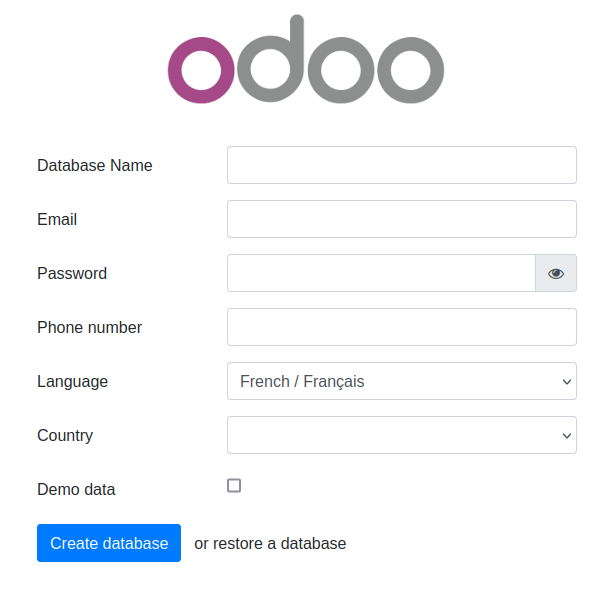
Open the final installation step at this web page :
http://[server IP]:8069/web/database/manager
-
Finish the installation by providing a database name, email and password. then click on Create Database. Depending on your system resources this may take more than 2 minutes without feedback ! Check your browser loading indicator.
-
Next, the web page will reload itself, and you should see the Applications list in ERPLibre:
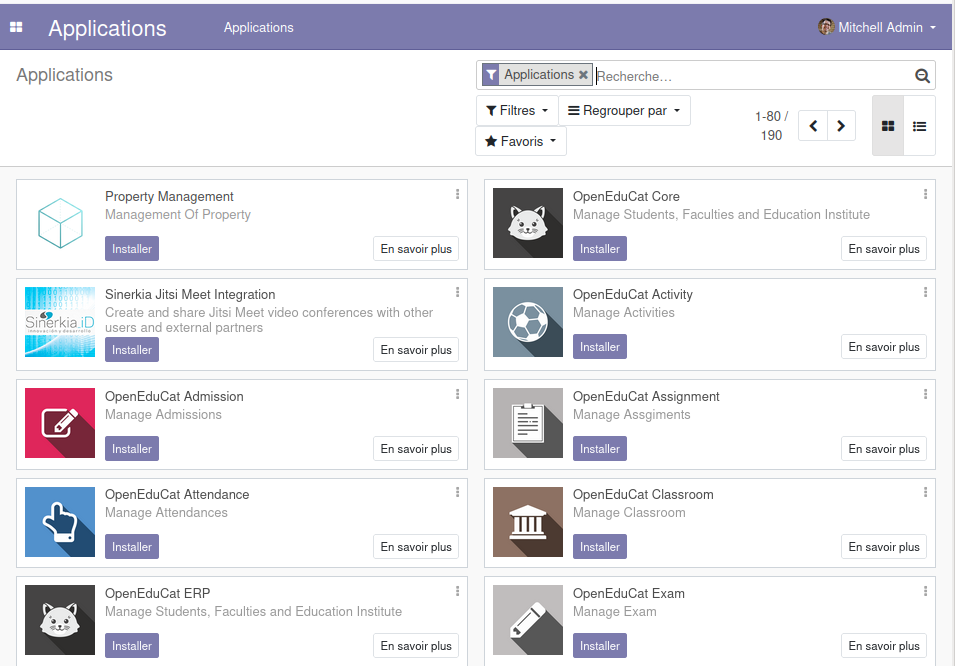
You can now personalize your ERPLibre installation.
For more information, read Docker guide.
Install from source code
Automated installation
For Debian/Ubuntu
sudo apt install make python3
Clone the project:
git clone https://github.com/ERPLibre/ERPLibre.git
cd ERPLibre
Follow the instruction on the following script, it will try to detect your environment.
make
Manually
Into Ubuntu, minimal dependency:
sudo apt install make git curl
Into Ubuntu, developer dependency:
sudo apt install make build-essential libssl-dev zlib1g-dev libreadline-dev libsqlite3-dev curl llvm libncurses5-dev libncursesw5-dev xz-utils tk-dev liblzma-dev libbz2-dev libldap2-dev libsasl2-dev
Clone the project:
git clone https://github.com/ERPLibre/ERPLibre.git
cd ERPLibre
Support Ubuntu 20.04, 22.04, 24.04, 25.04 and OSX.
make install_os
make install_odoo_18
Install a specific Odoo version:
make install_odoo_16
make install_odoo_17
make install_odoo_18
Update your configuration if you need to run from another interface than 127.0.0.1, file config.conf
xmlrpc_interface = 0.0.0.0
Show version :
make version
Ready to execute:
make run
Test
Execute ERPLibre test with his code generator.
time make test_full_fast
Documentation
| Guide | Description |
|---|---|
| DISCOVER | Learn and explore ERPLibre |
| DEVELOPMENT | Development environment setup |
| PRODUCTION | Production server deployment |
| RUN | Execution modes and use cases |
| CODE_GENERATOR | Odoo module code generation |
| MIGRATION | Database migration between versions |
| GIT_REPO | Git repository management |
| POETRY | Python dependency management |
| FAQ | Frequently asked questions |
| HOWTO | How-to guides |
| WINDOWS_INSTALLATION | Windows installation |
Contributing
See CONTRIBUTION.md for guidelines.
License
This project is licensed under the GNU Affero General Public License v3.0.