 Mathieu Benoit
9bce1a8503
Mathieu Benoit
9bce1a8503
Attaqué par trois lentilles sur le code écrit, avant de le lancer pour de vrai. Deux fautes valaient à elles seules l'exercice. Il n'aurait JAMAIS fonctionné. L'installeur était lancé par « sh », or il porte « set -euo pipefail » et un shebang bash : sur Debian /bin/sh est dash, qui répond « set: Illegal option -o pipefail » et sort à la PREMIÈRE ligne. Chaque étage aurait échoué sur l'installation, à tous les coups. Et « --detruire » pouvait emporter une machine étrangère. Il prenait toute entrée ssh dont le nom CONTENAIT « deep-pve », puis sur son rebond détruisait toute VM dont le nom contenait « deep-pve » — une « deep-pve-lab » de production tombait dedans, et « --purge » emporte les disques. Son tri « du plus profond au plus haut » comptait les « + » de l'alias, or alias_etage remplace le « + » du parent par un « - » : chaque alias en portait exactement UN, le tri ne triait rien, et la destruction partait du plus HAUT — le disque du parent emportait ses enfants sans qu'on les ait nommés. Il ignorait « --dry-run », ne lisait aucun code de retour, concluait « ✓ défait », et le menu le lançait d'une touche. Il ne détruit plus que ce que le RAPPORT nomme : un couple (parent, VMID) par étage, du plus profond d'après le niveau lu, égalité stricte du nom, arrêt CONSTATÉ avant destruction, codes de retour lus, et une confirmation par « OUI » après la liste. Six autres constats, tous réels. Le redémarrage se prouve par btime et non par le seul noyau — rejoué sur un étage déjà installé, on validait un redémarrage qui n'avait pas eu lieu, exactement le piège corrigé la semaine dernière dans le suivi. La sonde de disponibilité ne demande plus sudo, sinon un sudo lent se lisait « jamais joignable en ssh ». Les délais suivent la profondeur : le script existe pour mesurer un ralentissement de 36x, et un plafond fixe déclarait échouée une installation qui avançait. L'adresse fixe est contrôlée AVANT de télécharger une image et de démarrer une VM. Le DNS de l'hôte suit la spec, sinon apt meurt sans rien expliquer. Et l'essai à blanc ne prétend plus avoir atteint quoi que ce soit — son rapport était indiscernable d'une réussite, JSON compris. L'algorithme aussi : profondeur 0 rendait un plan d'UN étage, donc « --depth 0 » créait une VM ; et sur un hôte de quatre cœurs le premier étage recevait UN vCPU quand son invité en recevait deux — un parent plus étroit que son enfant. Les tests mordent, prouvé par mutation : remplacer le calcul du premier étage par la valeur imbriquée les laissait verts. --- EN --- Attacked by three lenses on the written code, before running it for real. Two faults alone justified the exercise. It would NEVER have worked. The installer was run by "sh", yet it carries "set -euo pipefail" and a bash shebang: on Debian /bin/sh is dash, which answers "set: Illegal option -o pipefail" and exits on the FIRST line. Every level would have failed at install, every time. And "--detruire" could take a stranger's machine. It took every ssh entry whose name CONTAINED "deep-pve", then on its jump host destroyed every VM whose name contained "deep-pve" — a production "deep-pve-lab" fell in, and "--purge" takes the disks. Its "deepest first" sort counted the "+" in the alias, yet alias_etage replaces the parent's "+" with a "-": every alias had exactly ONE, the sort sorted nothing, and destruction started from the TOP — the parent's disk took its children with it, unnamed. It ignored "--dry-run", read no return code, concluded "✓ done", and the menu fired it on one key. It now destroys only what the REPORT names: a (parent, VMID) pair per level, deepest first by the recorded level, strict name equality, shutdown VERIFIED before destruction, return codes read, and a "OUI" confirmation after the list. Six more findings, all real. The reboot is proven by btime, not by the kernel alone — replayed on an already-installed level, we validated a reboot that never happened, exactly the trap fixed last week in the monitor. The liveness probe no longer asks for sudo, or a slow sudo read as "never reachable by ssh". Timeouts follow the depth: the script exists to measure a 36x slowdown, and a fixed ceiling declared failed an install that was progressing. The static address is checked BEFORE downloading an image and starting a VM. The host's DNS follows the spec, or apt dies explaining nothing. And the dry run no longer claims to have reached anything — its report was indistinguishable from a success, JSON included. The algorithm too: depth 0 returned a ONE-level plan, so "--depth 0" created a VM; and on a four-core host the first level got ONE vCPU while its guest got two — a parent narrower than its child. The tests bite, proven by mutation: replacing the first level's computation with the nested value left them green. Assisted-by: Claude Opus 5 (cherry picked from commit 64b8e5063bd7f420cdeb27b88f94043190b5ecd4) |
||
|---|---|---|
| .claude | ||
| .github | ||
| conf | ||
| contracts | ||
| doc | ||
| docker | ||
| LongTest | ||
| manifest | ||
| mobile | ||
| private | ||
| requirement | ||
| script | ||
| test | ||
| .editorconfig | ||
| .erplibre-semver-version | ||
| .flake8 | ||
| .gitignore | ||
| .prettierignore | ||
| AI_POLICY.base.md | ||
| AI_POLICY.fr.md | ||
| AI_POLICY.md | ||
| CHANGELOG.base.md | ||
| CHANGELOG.fr.md | ||
| CHANGELOG.md | ||
| CLAUDE.md | ||
| coverage_run.sh | ||
| docker-compose-dev.yml | ||
| docker-compose.yml | ||
| env_var.sh | ||
| install.sh | ||
| LICENSE | ||
| Makefile | ||
| odoo_bin.sh | ||
| package-lock.json | ||
| package.json | ||
| poetry.toml | ||
| README.base.md | ||
| README.fr.md | ||
| README.md | ||
| run.sh | ||
| source_repo_addons.csv | ||
| test.sh | ||
| TODO.base.md | ||
| TODO.fr.md | ||
| TODO.md | ||
ERPLibre
ERPLibre is a CRM/ERP platform including automated installation, maintenance, and development of open source modules of the Odoo community version. It is a "soft-fork" of the Odoo Community Edition (OCE), meaning it aims at contributing back upstream. It is based on a set of production-ready modules, supported by the Odoo Community Association (OCA) and an ecosystem of specialized companies. This solution ensures digital sovereignty in a local environment while integrating pre-trained Generative Transformers (GPT), bringing an additional dimension to data management and automation.
Follow us on Mastodon : https://fosstodon.org/@erplibre
Features
- Multi-version Odoo support : run Odoo 12.0, 13.0, 14.0, 15.0, 16.0, 17.0 and 18.0 in the same workspace, with independent Python virtual environments (
.venv.erplibreand.venv.odooXX) - Interactive CLI (TODO.py) : guided interactive tool for installation, execution, database management, code formatting, mobile compilation, and more. Launch it with
make - Code generator : generate Odoo modules automatically with support for views, portal, snippets, inheritance, i18n, and JavaScript
- Selenium automation : web testing and automation with Selenium Grid, video recording, and login automation
- Mobile application : ERPLibre Home Mobile (Owl + Capacitor), compiled and deployed via TODO.py
- Docker deployment : production-ready Docker images with PostgreSQL 18 and PostGIS
- Deployment tools : Nginx, Apache, Cloudflare DDNS, Certbot SSL, systemd services
- Database tools : backup, restore, clone, migration between versions, production-to-dev migration
- Performance tools : request-per-second measurement, parallel test execution, coverage analysis
Supported Odoo versions
| Odoo version | Python | Status |
|---|---|---|
| 18.0 | 3.12.10 | Active |
| 17.0 | 3.10.18 | Inactive |
| 16.0 | 3.10.18 | Inactive |
| 15.0 | 3.8.20 | Deprecated |
| 14.0 | 3.8.20 | Deprecated |
| 13.0 | 3.7.17 | Deprecated |
| 12.0 | 3.7.17 | Deprecated |
Switch between versions with make switch_odoo_18, make switch_odoo_16, etc.
Supported platforms
- Ubuntu : 24.04, 25.10, 26.04 — 20.04 and 22.04 are dropped, pikepdf requiring a qpdf 12.2 built in C++20
- Linux Mint : 22.3
- Debian : 12 (bookworm) and 13 (trixie)
- Fedora : 41 and later
- AlmaLinux, Rocky Linux : 9 and 10 — RHEL and CentOS Stream take the same path
- openSUSE : Leap 16.0 and Tumbleweed
- Arch Linux : rolling release
- macOS : through mise or pyenv
- Windows : through WSL or Docker
- Architectures : amd64, arm64 and s390x (IBM Z mainframe)
Installation in production
Easy installation on Ubuntu or Debian using Docker
This has been tested in Debian 12 and Ubuntu 24.04 LTS.
Note : This is meant for a test environment, on a local network or similar environment not directly exposed to the Internet.
-
Make sure Docker and nginx web server are installed:
sudo apt install docker.io docker-compose-v2 nginx -
Get the latest ERPLibre Docker compose file:
wget https://raw.githubusercontent.com/ERPLibre/ERPLibre/master/docker-compose.yml -
Install and run ERPLibre with Docker running as a daemon (web server):
sudo docker compose up -d -
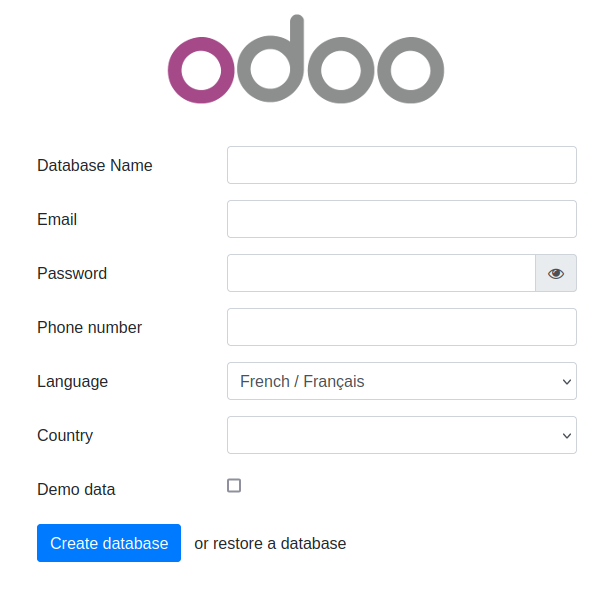
Open the final installation step at this web page :
http://[server IP]:8069/web/database/manager
-
Finish the installation by providing a database name, email and password. then click on Create Database. Depending on your system resources this may take more than 2 minutes without feedback ! Check your browser loading indicator.
-
Next, the web page will reload itself, and you should see the Applications list in ERPLibre:
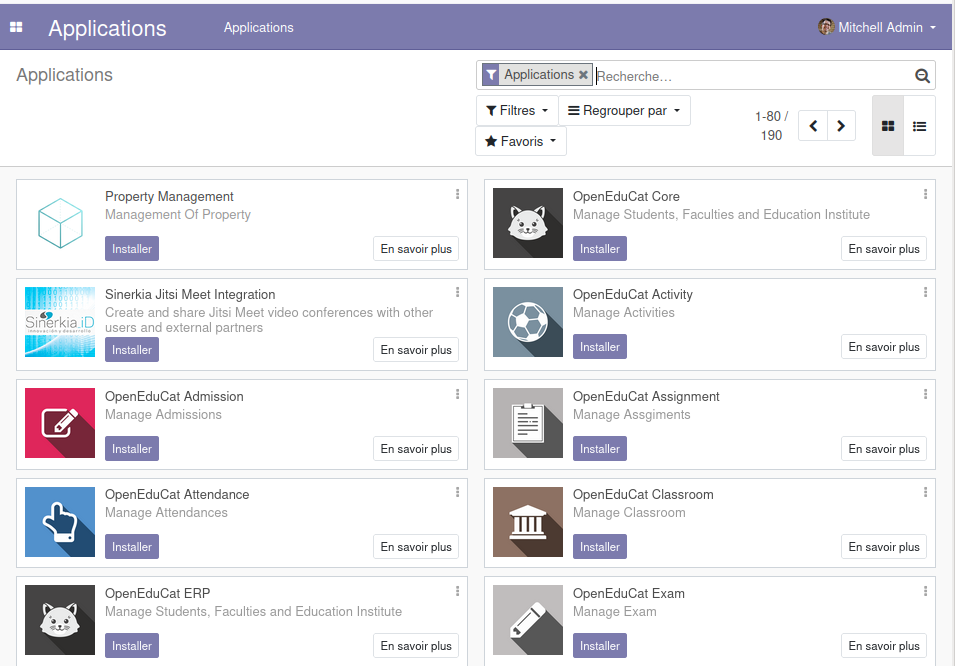
You can now personalize your ERPLibre installation.
For more information, read Docker guide.
Install from source code
Automated installation
For Debian/Ubuntu
sudo apt install make python3
Clone the project:
git clone https://github.com/ERPLibre/ERPLibre.git
cd ERPLibre
Follow the instruction on the following script, it will try to detect your environment.
make
Manually
Into Ubuntu, minimal dependency:
sudo apt install make git curl
Into Ubuntu, developer dependency:
sudo apt install make build-essential libssl-dev zlib1g-dev libreadline-dev libsqlite3-dev curl llvm libncurses5-dev libncursesw5-dev xz-utils tk-dev liblzma-dev libbz2-dev libldap2-dev libsasl2-dev
Clone the project:
git clone https://github.com/ERPLibre/ERPLibre.git
cd ERPLibre
make install_os detects the distribution and picks the right dependency script: apt for Ubuntu, Linux Mint and Debian, dnf for Fedora and the RHEL family, zypper for openSUSE, pacman for Arch. See the supported platforms above.
make install_os
make install_odoo_18
Install a specific Odoo version:
make install_odoo_16
make install_odoo_17
make install_odoo_18
Update your configuration if you need to run from another interface than 127.0.0.1, file config.conf
xmlrpc_interface = 0.0.0.0
Show version :
make version
Ready to execute:
make run
Test
Execute ERPLibre test with his code generator.
time make test_full_fast
Documentation
| Guide | Description |
|---|---|
| DISCOVER | Learn and explore ERPLibre |
| DEVELOPMENT | Development environment setup |
| PRODUCTION | Production server deployment |
| RUN | Execution modes and use cases |
| CODE_GENERATOR | Odoo module code generation |
| MIGRATION | Database migration between versions |
| GIT_REPO | Git repository management |
| POETRY | Python dependency management |
| FAQ | Frequently asked questions |
| HOWTO | How-to guides |
| WINDOWS_INSTALLATION | Windows installation |
Contributing
See CONTRIBUTION.md for guidelines.
License
This project is licensed under the GNU Affero General Public License v3.0.