 Mathieu Benoit
4bc2fa6097
Mathieu Benoit
4bc2fa6097
Le conseil « rejouer install_proxmox.sh sur l'hôte » ne pouvait PAS marcher : la VM clone le dépôt distant, donc sa copie du script est celle du distant — tant que le correctif n'y est pas, celle qui ne corrige rien. Trois hôtes de suite sont tombés dessus, avec le même message inutile. L'écran répare donc : gel de cloud-init, réécriture de /etc/hosts, relance des unités, constat du montage — le pendant exact de l'offre de créer un pont. Écrit, puis ATTAQUÉ par trois lentilles sur le code réel. Ce qu'elles ont mesuré valait la peine. /etc/hosts se réécrivait en DEUX écritures — « sed -i » puis « printf >> » — alors que la docstring promettait l'inverse. Sed refusé et ajout réussi, la ligne 127.0.1.1 survivait EN PREMIER et la nôtre s'ajoutait une fois par tentative ; sed réussi et ajout refusé, l'hôte perdait l'entrée de son nom, et chaque sudo y attendait ensuite le résolveur. C'est maintenant un fichier complet bâti dans un temporaire, VÉRIFIÉ, puis recopié — « cat > » et non « mv », qui remplacerait l'inode et perdrait mode et propriétaire. Le contrôle final s'en remettait à « getent hosts », qui réussit via mDNS même quand rien n'a été écrit — et acceptait les fe80:: que notre propre code rejette. Il relit désormais ce qui a été écrit. awk remplace sed pour filtrer : « print » émet un saut de ligne, donc un /etc/hosts non terminé par un — cloud-init n'en met pas — est normalisé. Sans ça notre ligne se collait à la précédente et le nom du nœud partait sur l'adresse d'une autre machine. Trois autres, du même acabit. Les dépendants de pmxcfs sont relancés eux aussi : actifs pendant la panne, ils échouaient sur ipcc_send_rec, et les laisser donnait une GUI en « communication failure » juste après notre ✓. Un silence du lien n'est plus lu comme une absence de montage. Et l'adresse n'est mise en cause que si pve-cluster a réellement démarré. Les tests exécutent les commandes au lieu de les relire, bouchons capables d'ÉCHOUER : écriture refusée, fichier sans saut de ligne final, tabulations, start qui rate, montage qui disparaît pendant la reconfirmation. Prouvé par mutation — trois HOSTS-KO changés en HOSTS-OK font rougir le test. --- EN --- The advice "replay install_proxmox.sh on the host" could NOT work: the VM clones the remote, so its copy of the script is the remote's — while the fix is not there, the one that fixes nothing. Three hosts in a row hit it with the same useless message. So the screen repairs: freeze cloud-init, rewrite /etc/hosts, restart the units, verify the mount — the exact counterpart of the offer to create a bridge. Written, then ATTACKED by three lenses on the real code. What they measured was worth it. /etc/hosts was rewritten in TWO writes — "sed -i" then "printf >>" — while the docstring promised the opposite. Sed refused and append succeeded: the 127.0.1.1 line survived FIRST and ours was added once per attempt; sed succeeded and append refused: the host lost its own name entry, and every sudo then waited on the resolver. It is now a complete file built in a temporary, VERIFIED, then copied over — "cat >" not "mv", which would replace the inode and lose mode and owner. The final check relied on "getent hosts", which succeeds via mDNS even when nothing was written — and accepted the fe80:: our own code rejects. It now re-reads what was written. awk replaces sed for filtering: "print" emits a newline, so an /etc/hosts with no final one — cloud-init omits it — gets normalised. Without that our line glued onto the previous one and the node's name pointed at another machine's address. Three more of the same kind. pmxcfs's dependents are restarted too: active throughout the outage, they failed on ipcc_send_rec, and leaving them gave a GUI in "communication failure" right after our ✓. A silent link is no longer read as a missing mount. And the address is only blamed if pve-cluster actually started. The tests execute the commands instead of reading them, with stubs able to FAIL: refused write, file with no final newline, tabs, a start that fails, a mount that vanishes during reconfirmation. Proven by mutation — three HOSTS-KO turned into HOSTS-OK make the test go red. Assisted-by: Claude Opus 5 (cherry picked from commit d4f9358c6cb562029cc2ca9eb478d80c6a0a19a4) |
||
|---|---|---|
| .claude | ||
| .github | ||
| conf | ||
| contracts | ||
| doc | ||
| docker | ||
| manifest | ||
| mobile | ||
| private | ||
| requirement | ||
| script | ||
| test | ||
| .editorconfig | ||
| .erplibre-semver-version | ||
| .flake8 | ||
| .gitignore | ||
| .prettierignore | ||
| AI_POLICY.base.md | ||
| AI_POLICY.fr.md | ||
| AI_POLICY.md | ||
| CHANGELOG.base.md | ||
| CHANGELOG.fr.md | ||
| CHANGELOG.md | ||
| CLAUDE.md | ||
| coverage_run.sh | ||
| docker-compose-dev.yml | ||
| docker-compose.yml | ||
| env_var.sh | ||
| install.sh | ||
| LICENSE | ||
| Makefile | ||
| odoo_bin.sh | ||
| package-lock.json | ||
| package.json | ||
| poetry.toml | ||
| README.base.md | ||
| README.fr.md | ||
| README.md | ||
| run.sh | ||
| source_repo_addons.csv | ||
| test.sh | ||
| TODO.base.md | ||
| TODO.fr.md | ||
| TODO.md | ||
ERPLibre
ERPLibre is a CRM/ERP platform including automated installation, maintenance, and development of open source modules of the Odoo community version. It is a "soft-fork" of the Odoo Community Edition (OCE), meaning it aims at contributing back upstream. It is based on a set of production-ready modules, supported by the Odoo Community Association (OCA) and an ecosystem of specialized companies. This solution ensures digital sovereignty in a local environment while integrating pre-trained Generative Transformers (GPT), bringing an additional dimension to data management and automation.
Follow us on Mastodon : https://fosstodon.org/@erplibre
Features
- Multi-version Odoo support : run Odoo 12.0, 13.0, 14.0, 15.0, 16.0, 17.0 and 18.0 in the same workspace, with independent Python virtual environments (
.venv.erplibreand.venv.odooXX) - Interactive CLI (TODO.py) : guided interactive tool for installation, execution, database management, code formatting, mobile compilation, and more. Launch it with
make - Code generator : generate Odoo modules automatically with support for views, portal, snippets, inheritance, i18n, and JavaScript
- Selenium automation : web testing and automation with Selenium Grid, video recording, and login automation
- Mobile application : ERPLibre Home Mobile (Owl + Capacitor), compiled and deployed via TODO.py
- Docker deployment : production-ready Docker images with PostgreSQL 18 and PostGIS
- Deployment tools : Nginx, Apache, Cloudflare DDNS, Certbot SSL, systemd services
- Database tools : backup, restore, clone, migration between versions, production-to-dev migration
- Performance tools : request-per-second measurement, parallel test execution, coverage analysis
Supported Odoo versions
| Odoo version | Python | Status |
|---|---|---|
| 18.0 | 3.12.10 | Active |
| 17.0 | 3.10.18 | Inactive |
| 16.0 | 3.10.18 | Inactive |
| 15.0 | 3.8.20 | Deprecated |
| 14.0 | 3.8.20 | Deprecated |
| 13.0 | 3.7.17 | Deprecated |
| 12.0 | 3.7.17 | Deprecated |
Switch between versions with make switch_odoo_18, make switch_odoo_16, etc.
Supported platforms
- Ubuntu : 24.04, 25.10, 26.04 — 20.04 and 22.04 are dropped, pikepdf requiring a qpdf 12.2 built in C++20
- Linux Mint : 22.3
- Debian : 12 (bookworm) and 13 (trixie)
- Fedora : 41 and later
- AlmaLinux, Rocky Linux : 9 and 10 — RHEL and CentOS Stream take the same path
- openSUSE : Leap 16.0 and Tumbleweed
- Arch Linux : rolling release
- macOS : through mise or pyenv
- Windows : through WSL or Docker
- Architectures : amd64, arm64 and s390x (IBM Z mainframe)
Installation in production
Easy installation on Ubuntu or Debian using Docker
This has been tested in Debian 12 and Ubuntu 24.04 LTS.
Note : This is meant for a test environment, on a local network or similar environment not directly exposed to the Internet.
-
Make sure Docker and nginx web server are installed:
sudo apt install docker.io docker-compose-v2 nginx -
Get the latest ERPLibre Docker compose file:
wget https://raw.githubusercontent.com/ERPLibre/ERPLibre/master/docker-compose.yml -
Install and run ERPLibre with Docker running as a daemon (web server):
sudo docker compose up -d -
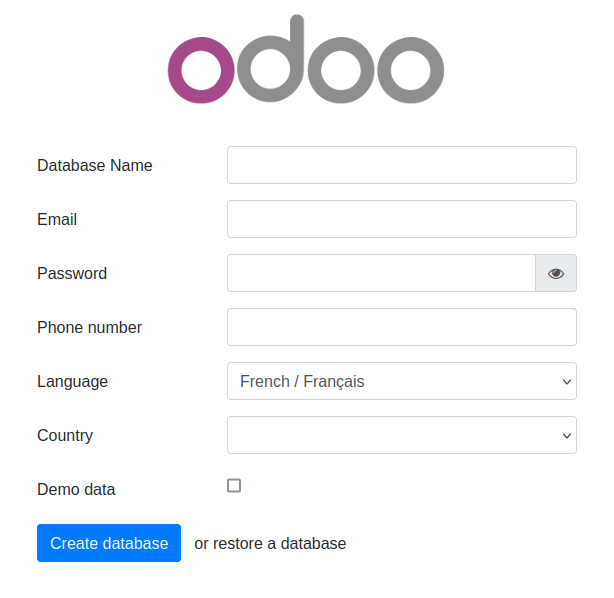
Open the final installation step at this web page :
http://[server IP]:8069/web/database/manager
-
Finish the installation by providing a database name, email and password. then click on Create Database. Depending on your system resources this may take more than 2 minutes without feedback ! Check your browser loading indicator.
-
Next, the web page will reload itself, and you should see the Applications list in ERPLibre:
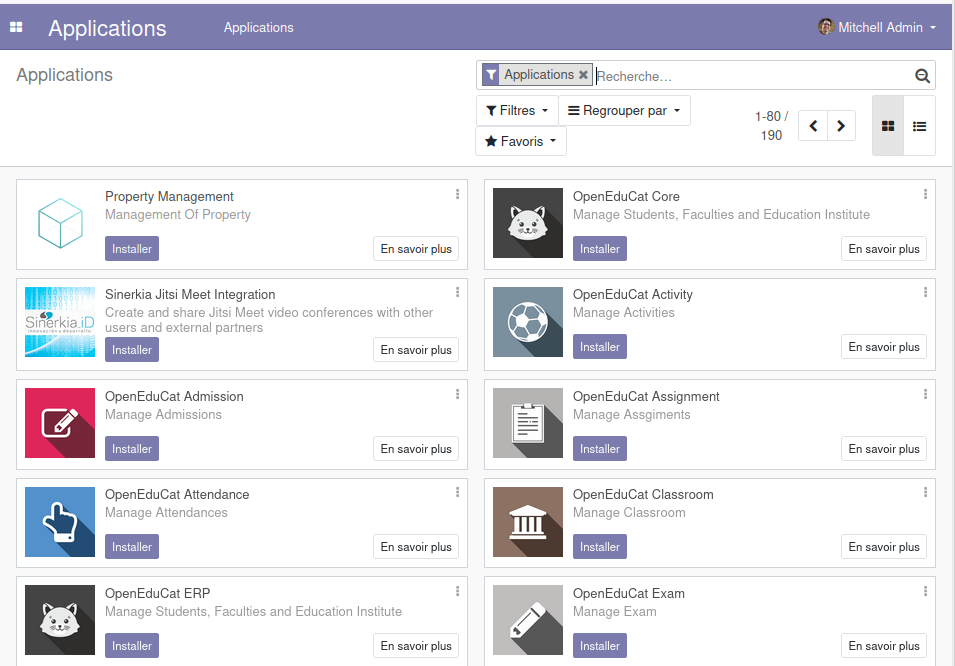
You can now personalize your ERPLibre installation.
For more information, read Docker guide.
Install from source code
Automated installation
For Debian/Ubuntu
sudo apt install make python3
Clone the project:
git clone https://github.com/ERPLibre/ERPLibre.git
cd ERPLibre
Follow the instruction on the following script, it will try to detect your environment.
make
Manually
Into Ubuntu, minimal dependency:
sudo apt install make git curl
Into Ubuntu, developer dependency:
sudo apt install make build-essential libssl-dev zlib1g-dev libreadline-dev libsqlite3-dev curl llvm libncurses5-dev libncursesw5-dev xz-utils tk-dev liblzma-dev libbz2-dev libldap2-dev libsasl2-dev
Clone the project:
git clone https://github.com/ERPLibre/ERPLibre.git
cd ERPLibre
make install_os detects the distribution and picks the right dependency script: apt for Ubuntu, Linux Mint and Debian, dnf for Fedora and the RHEL family, zypper for openSUSE, pacman for Arch. See the supported platforms above.
make install_os
make install_odoo_18
Install a specific Odoo version:
make install_odoo_16
make install_odoo_17
make install_odoo_18
Update your configuration if you need to run from another interface than 127.0.0.1, file config.conf
xmlrpc_interface = 0.0.0.0
Show version :
make version
Ready to execute:
make run
Test
Execute ERPLibre test with his code generator.
time make test_full_fast
Documentation
| Guide | Description |
|---|---|
| DISCOVER | Learn and explore ERPLibre |
| DEVELOPMENT | Development environment setup |
| PRODUCTION | Production server deployment |
| RUN | Execution modes and use cases |
| CODE_GENERATOR | Odoo module code generation |
| MIGRATION | Database migration between versions |
| GIT_REPO | Git repository management |
| POETRY | Python dependency management |
| FAQ | Frequently asked questions |
| HOWTO | How-to guides |
| WINDOWS_INSTALLATION | Windows installation |
Contributing
See CONTRIBUTION.md for guidelines.
License
This project is licensed under the GNU Affero General Public License v3.0.