 Mathieu Benoit
1726cb5dab
Mathieu Benoit
1726cb5dab
snap was not a choice but a fate: we disabled snapd, then gnome-core
pulled a Firefox snap that froze the install for thirty minutes. The
previous fix imposed "deb". Three answers are now offered.

  deb      nothing but .deb, epiphany-browser as the browser. Default,
           and lightest: nothing extra to download.
  flatpak  Flatpak tooling as well, WITHOUT the Flathub remote or any
           install. The machine is ready, the admin picks its remotes.
  snap     Ubuntu's default, snapd left running and Firefox as a snap.
           It is the only mode where snapd is not disabled -- disabling
           it was precisely the cause of the freeze.

The question is only asked when it means something: at least one
graphical VM on a distro shipping snapd, Ubuntu alone here. A server
pulls no snap, and Debian ships none. The TUI greys the choice out and
says why; the CLI does not ask.

Verified on a 26.04 VM: snapd is indeed preinstalled (2.75.2), flatpak
and its GNOME Software plugin are packaged, and firefox-esr does not
exist on Ubuntu.

--- FR ---

snap n'était plus un choix mais une fatalité : on coupait snapd, puis
gnome-core tirait un Firefox-snap qui figeait l'installation trente
minutes. Le correctif précédent imposait « deb ». Trois réponses sont
maintenant offertes.

  deb      rien que des .deb, epiphany-browser comme navigateur. Défaut,
           et le plus léger : rien de plus à télécharger.
  flatpak  l'outillage Flatpak en plus, SANS dépôt Flathub ni
           installation. La machine est prête, l'administrateur choisit
           ses dépôts.
  snap     le défaut d'Ubuntu, snapd laissé actif et Firefox en snap.
           C'est le seul mode où snapd n'est pas coupé — l'y couper
           était précisément la cause du blocage.

La question n'est posée que lorsqu'elle a un sens : au moins une VM
graphique sur une distribution qui livre snapd, Ubuntu seule ici. Un
serveur ne tire aucun snap, et Debian n'en livre pas. La TUI grise le
choix et dit pourquoi ; la CLI ne le demande pas.

Vérifié sur une VM 26.04 : snapd y est bien préinstallé (2.75.2),
flatpak et son greffon GNOME Software sont empaquetés, et firefox-esr
n'existe pas sur Ubuntu.

Assisted-by: Claude Opus 5
|
||
|---|---|---|
| .claude | ||
| .github | ||
| conf | ||
| contracts | ||
| doc | ||
| docker | ||
| manifest | ||
| mobile | ||
| private | ||
| requirement | ||
| script | ||
| test | ||
| .editorconfig | ||
| .erplibre-semver-version | ||
| .flake8 | ||
| .gitignore | ||
| .prettierignore | ||
| AI_POLICY.base.md | ||
| AI_POLICY.fr.md | ||
| AI_POLICY.md | ||
| CHANGELOG.base.md | ||
| CHANGELOG.fr.md | ||
| CHANGELOG.md | ||
| CLAUDE.md | ||
| coverage_run.sh | ||
| docker-compose-dev.yml | ||
| docker-compose.yml | ||
| env_var.sh | ||
| install.sh | ||
| LICENSE | ||
| Makefile | ||
| odoo_bin.sh | ||
| package-lock.json | ||
| package.json | ||
| poetry.toml | ||
| README.base.md | ||
| README.fr.md | ||
| README.md | ||
| run.sh | ||
| source_repo_addons.csv | ||
| test.sh | ||
| TODO.base.md | ||
| TODO.fr.md | ||
| TODO.md | ||
ERPLibre
ERPLibre is a CRM/ERP platform including automated installation, maintenance, and development of open source modules of the Odoo community version. It is a "soft-fork" of the Odoo Community Edition (OCE), meaning it aims at contributing back upstream. It is based on a set of production-ready modules, supported by the Odoo Community Association (OCA) and an ecosystem of specialized companies. This solution ensures digital sovereignty in a local environment while integrating pre-trained Generative Transformers (GPT), bringing an additional dimension to data management and automation.
Follow us on Mastodon : https://fosstodon.org/@erplibre
Features
- Multi-version Odoo support : run Odoo 12.0, 13.0, 14.0, 15.0, 16.0, 17.0 and 18.0 in the same workspace, with independent Python virtual environments (
.venv.erplibreand.venv.odooXX) - Interactive CLI (TODO.py) : guided interactive tool for installation, execution, database management, code formatting, mobile compilation, and more. Launch it with
make - Code generator : generate Odoo modules automatically with support for views, portal, snippets, inheritance, i18n, and JavaScript
- Selenium automation : web testing and automation with Selenium Grid, video recording, and login automation
- Mobile application : ERPLibre Home Mobile (Owl + Capacitor), compiled and deployed via TODO.py
- Docker deployment : production-ready Docker images with PostgreSQL 18 and PostGIS
- Deployment tools : Nginx, Apache, Cloudflare DDNS, Certbot SSL, systemd services
- Database tools : backup, restore, clone, migration between versions, production-to-dev migration
- Performance tools : request-per-second measurement, parallel test execution, coverage analysis
Supported Odoo versions
| Odoo version | Python | Status |
|---|---|---|
| 18.0 | 3.12.10 | Active |
| 17.0 | 3.10.18 | Inactive |
| 16.0 | 3.10.18 | Inactive |
| 15.0 | 3.8.20 | Deprecated |
| 14.0 | 3.8.20 | Deprecated |
| 13.0 | 3.7.17 | Deprecated |
| 12.0 | 3.7.17 | Deprecated |
Switch between versions with make switch_odoo_18, make switch_odoo_16, etc.
Supported platforms
- Linux : Ubuntu 24.04, 25.10, 26.04; Debian 12; AlmaLinux 9+; Rocky Linux 9+; Arch Linux
- macOS : via mise ou pyenv
- Windows : via WSL or Docker
- Mainframe : 390x architecture
Installation in production
Easy installation on Ubuntu or Debian using Docker
This has been tested in Debian 12 and Ubuntu 24.04 LTS.
Note : This is meant for a test environment, on a local network or similar environment not directly exposed to the Internet.
-
Make sure Docker and nginx web server are installed:
sudo apt install docker.io docker-compose-v2 nginx -
Get the latest ERPLibre Docker compose file:
wget https://raw.githubusercontent.com/ERPLibre/ERPLibre/master/docker-compose.yml -
Install and run ERPLibre with Docker running as a daemon (web server):
sudo docker compose up -d -
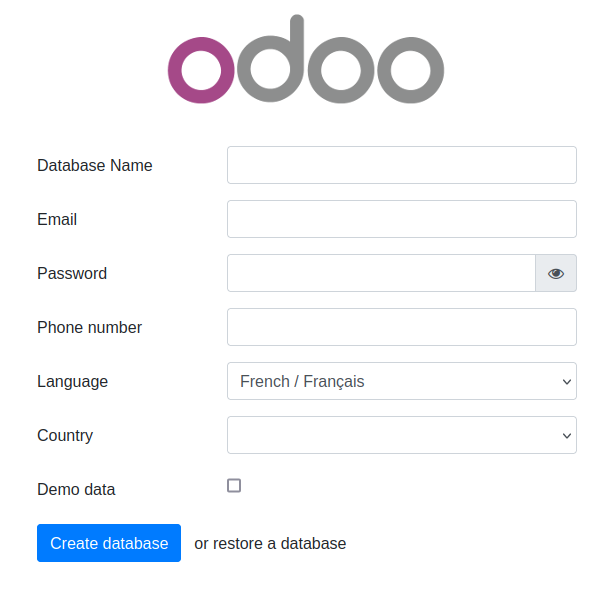
Open the final installation step at this web page :
http://[server IP]:8069/web/database/manager
-
Finish the installation by providing a database name, email and password. then click on Create Database. Depending on your system resources this may take more than 2 minutes without feedback ! Check your browser loading indicator.
-
Next, the web page will reload itself, and you should see the Applications list in ERPLibre:
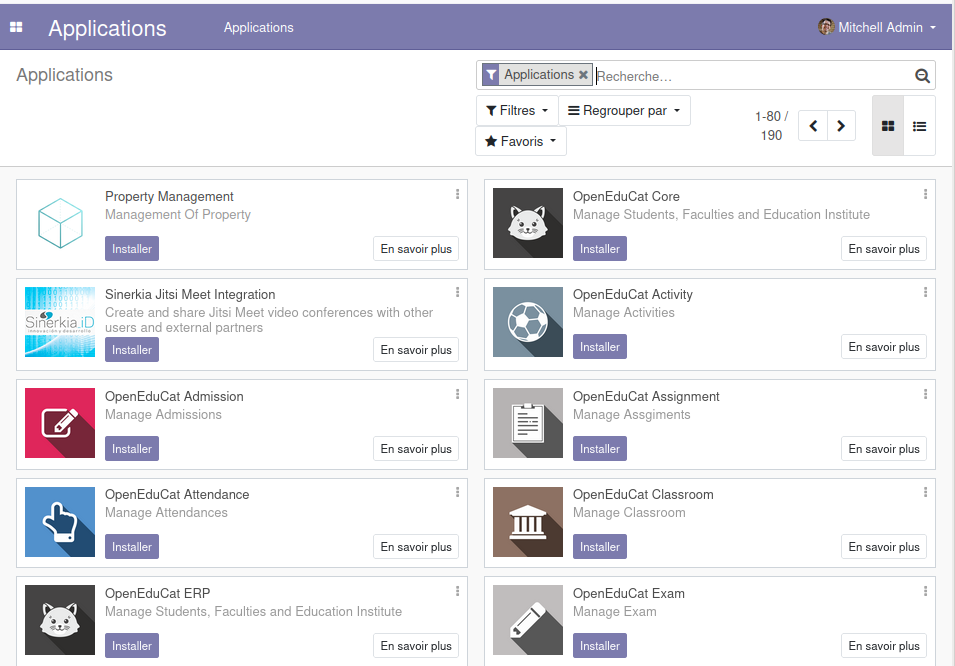
You can now personalize your ERPLibre installation.
For more information, read Docker guide.
Install from source code
Automated installation
For Debian/Ubuntu
sudo apt install make python3
Clone the project:
git clone https://github.com/ERPLibre/ERPLibre.git
cd ERPLibre
Follow the instruction on the following script, it will try to detect your environment.
make
Manually
Into Ubuntu, minimal dependency:
sudo apt install make git curl
Into Ubuntu, developer dependency:
sudo apt install make build-essential libssl-dev zlib1g-dev libreadline-dev libsqlite3-dev curl llvm libncurses5-dev libncursesw5-dev xz-utils tk-dev liblzma-dev libbz2-dev libldap2-dev libsasl2-dev
Clone the project:
git clone https://github.com/ERPLibre/ERPLibre.git
cd ERPLibre
Support Ubuntu 24.04, 25.10, 26.04, AlmaLinux 9+, Rocky Linux 9+ and OSX.
make install_os
make install_odoo_18
Install a specific Odoo version:
make install_odoo_16
make install_odoo_17
make install_odoo_18
Update your configuration if you need to run from another interface than 127.0.0.1, file config.conf
xmlrpc_interface = 0.0.0.0
Show version :
make version
Ready to execute:
make run
Test
Execute ERPLibre test with his code generator.
time make test_full_fast
Documentation
| Guide | Description |
|---|---|
| DISCOVER | Learn and explore ERPLibre |
| DEVELOPMENT | Development environment setup |
| PRODUCTION | Production server deployment |
| RUN | Execution modes and use cases |
| CODE_GENERATOR | Odoo module code generation |
| MIGRATION | Database migration between versions |
| GIT_REPO | Git repository management |
| POETRY | Python dependency management |
| FAQ | Frequently asked questions |
| HOWTO | How-to guides |
| WINDOWS_INSTALLATION | Windows installation |
Contributing
See CONTRIBUTION.md for guidelines.
License
This project is licensed under the GNU Affero General Public License v3.0.